Wednesday, 27 March 2019

What sensors do we have in our Smartphones? What are their use?


What sensors do we have in our Smartphones? What are their use?


Nowadays , a smartphone comes with various types of sensors such as  Gyroscope, Accelerometer Sensor, Proximity Sensor, Barometer Sensor, Magnetometer Sensor ,Pedometer Sensor, Light Sensors, Thermometer, Biometrics sensor etc. to give us multiple smart features.

Now to a newbie user, it is very easy to get confused about all these as they don't know what purposes these sensors serve .

But there is no need to be worried ! This article covers all the info  you need to know about sensors. So keep reading!

 1.  Proximity Sensor :-

Every smartphone has this sensor. Whenever you make or receive a call , this sensor gets turned on and when you put your phone to your ear , it turns the screen off and whenever you remove it from your ear, the screen gets turned on.. A very essential feature.


There are other apps like wave music and ....... which make use of this in unique ways.

 2. Accelerometer :-

To describe it in simple terms , this sensors renders the orientation of your device. It means when you turn the 'Auto-rotation' option in your notification panel, it rotates the screen according to the way you hold your phone, be it in Portrait or vertical mode and Landscape or horizontal mode in order to provide you the best view of your choice.


 3. Gyroscope. :-

It's a sensor designed to measure angular velocity. In simple terms , like the Accelerometer it determines the orientation,the movement of your device . It's like the Accelerometer sensor but it's more advanced and accurate.
Here we can take the example of a car racing game where you have to change your device's direction frequently from right to left and vice-versa to move your car. It becomes possible only because of this sensor.


 4. Light sensor:-

Another important sensor of our smartphones. Whenever we turn our " Auto-brightness " on , in the display settings, it lowers our screen's brightness in low light conditions such as in our homes so that it doesn't hurt our eyes and whenever we go out in the sunlight, the screen's brightness gets increased automatically, so that we can get a proper view in the bright sunlight.


 5. Magnetometer :-

This sensor enables a device to determine the direction i.e. acts as a Compass.

Sometimes in a new place we wonder which side is north or east or west or south . In this sort of situations this feature if your comes in really handy.


 6. Barometer :-

 Tracks the altitude or the distance from the sea-level of your device which in turn helps to determine the exact location of the device. It is also used to measure air pressure and any sudden weather changes.


7. Biometrics sensor :-

This  is one of the most important sensor that your phone should have as it is related intrinsically to the safety and security of you and your device . All the lock and unlock mechanisms like Fingerprint impression, Face unlock , Iris scanner except pin and patterns, is based on this sensor to improve the security of our devices on the go.


 8. Thermometer sensor:-

As is evident from the name, this sensor measures the temperature of your device as well as of outside .


 9. Pedometer sensor :-

If you have this sensor your phone , it will serve the purpose of accurately counting your steps when you walk or run and therefore can be an aid in your quest for fitness.

Thanks for reading! I hope this article cleared all your doubts about the sensors in our Smartphones and if you really got to know something new, share this with everyone you know as more views will motivate me to write more such informative articles for you!

Friday, 22 March 2019

What is screen pinning? How to use it on any android phone?


What is screen pinning? How to use it on any android phone?


With the evolution of smartphone gaming, most of the people spend a lot of time playing games on their phones. Are you a gamer or heavy user of smartphone? Then this feature of screen pinning will be  handy for you.

 First of all, let's discuss what's screen pinning and then we will try to explain how can make use of this smart feature that your phone has.

'Screen pinning' , the term is quite self-explanatory. It means pinning a particular screen or window or an app through which you can only access that screen or app and all the other buttons and apps will be inaccessible until you unpin that app or game or window..

While playing a game or using an app sometimes call or notification comes and intervenes the gameplay or an important job.

Sometimes while using an application we mistakenly touch home or back button which breaks the rhythm of the gameplay or the important job we might be doing at that moment.


Sometimes while we have to give our phones to a child or someone else as they want to play a game or use a certain app, screen pinning ensures that they can only play the game or use that app and can't use anything else even if they want which protects your privacy.

Thus this feature really comes handy in these sort of situations.

This feature is available from Android's 'Lollipop' version and upwards, but still some phones may not have this feature. Nothing can be done about that!

Those who have it can use it to enjoy a smarter gaming experience and distraction-free work, all without sacrificing your privacy and security..


How to access and make use of it?

First , head to settings and then tap on security. There you can find screen pinning option. Next you will have the option to enable it.

After enabling, you have to select the app or the screen you want to pin and then touch the overview button. Next you have to swipe up and then you can notice a small pin , then touching it will enable it.

When you want to unpin you have to press and hold the overview button for a while and then it will be unpinned.

So, that's it for now. Thanks for reading. I hope you found this article helpful ! For more such info, keep visiting the site and share as it will motivate me to bring out more articles for you.

Wednesday, 20 March 2019


What should be done before you sell your phone ?


As smartphones have become a part of our daily lives, we store a lot of personal valuable data in it to get it handy .So while selling this piece of our day-to-day lifestyle , we must be very careful.

Here are few points to consider before you sell your phone :-

 1.  While selling it's not enough to only factory reset your phone once as the data can be easily restored with a recovery software. It only deletes the addresses of the files and thinks and shows  that it's completely free. But surprisingly it's not. The data can be recovered and all your  personal data can be stolen which can jeopardize your life afterwards!

2. We should do a double format before selling your phone.

First , remove all your accounts from your phone, such as , Facebook, Twitter ,Instagram, Pinterest ,Google plus etc.
Then encrypt your phone which can be done from the settings menu and then format it. Now load some random data which has no connection with you such as music , videos etc. in your device and then format it once again. So that one can never recover your original personal data and you can enjoy a peace of mind!

3. There's a software called Dr. Fone , available for both android and iOS which erases all the data from your phone and not be recovered by any software. You can try this as well..

 4.  Don't forget to remove your sim card and memory cards before formatting !

I hope you liked the article and if it indeed proved useful don't forget to share it with your friends and relatives so that they too can be get benefitted from it.
If you have any questions you are welcome to comment below..

Sunday, 17 March 2019

Stock Android vs Android One vs Android Go :-

Stock Android vs Android One vs Android Go :-


Everyone is using a Smartphone nowadays which are popularly based on Android or iOS.

Now there are phones which are based on Stock android which means there will be neither  bloatwares nor useless, pre-installed third-party apps on your device , helping it deliver a smooth and lag-free performance for a longer period. Stock android can be seen in Google's flagship devices like Pixel phones , Nexus devices, Moto devices etc.


There are no skin on top of it like MI phones or Honor's 'Emui'.
Phones having stock android  are the first receivers of guaranteed android updates from Google itself as they are the easiest to apply such ota updates and are most secured. These are the pure android phones and can be referred as the benchmark of Android.

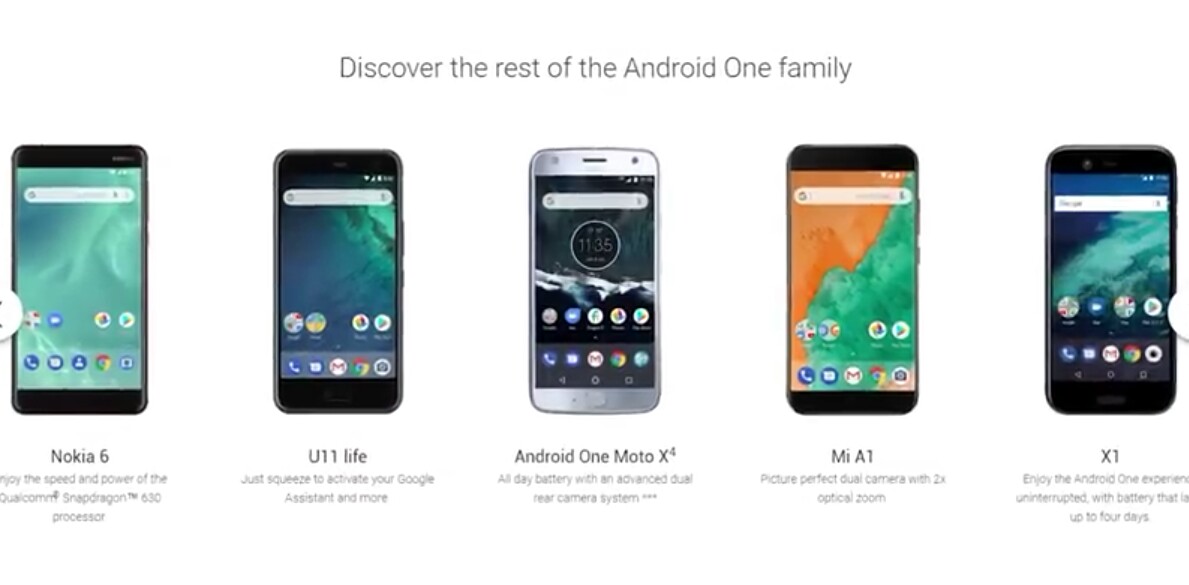
Now we also come across devices which are known as Android One phones. This programme was initially meant for low-end devices and introduced in India but they can now be seen in mid-range or higher mid-range phones as well.

They are an amalgamation of stock android and a few customisations done by the manufacturer. It means it neither has an over-the-top UI of the manufacturer like MIUI or EMUI nor it's a stock android like in Nexus, Pixel, Moto devices . It's close to stock but in phones of different companies like Samsung, Mi ,Honor etc , with a few twist which is actually liked by many instead of a plain and clear stock.


These phones receive android
updates for 2 years and security patch upgrades directly from Google for atleast 3 years.

Android Go programme actually replaces the original Android One programme which is a toned down version of Android, designed for low-end entry-level phones to give smooth performance even in less powerful devices.


Here you can find less pre-installed apps and lot of original apps are replaced by special 'go' apps like YouTube Go, Gmail Go , Maps Go etc.


The biggest difference between Stock android , Android One and Android go is that unlike the Stock and One, it doesn't come directly from Google Inc. Google gives it to an OEM like Nokia and then Nokia releases it and is responsible for further upgrades and updates . As a result, you are not really guaranteed to get updates or timely updates.

There are phones which does not belong to any of these 3 categories. They say that they come with stock android but with their own UI like Asus's  Zen UI , Vivo's  Funtouch ,  Samsung's Touchwiz or the latest Experience 10 , Mi 's MIUI etc. in which they include some of their customisations and a few apps.


In a nutshell , every user's need is taken care of and they can choose  according to their taste and need.

I hope you liked the article and if it indeed proved useful don't forget to share it with your friends and relatives so that they too can be get benefitted from it.
If you have any questions you are welcome to comment below..

Saturday, 9 March 2019

What are the differences among DDR/DDR 2/DDR 3/ DDR 4 Ram? What is the best choice among them?


Q. What are the differences among DDR/DDR 2/DDR 3/ DDR 4 Ram? What is the best choice among them?

While going to buy a laptop or a desktop we are given the choice of various configurations including various types of Ram and we often get confused, not having sufficient knowledge.

Well, in this article , I am going to compare DDR1 vs DDR2 vs DDR3 vs DDR4 and mention difference between DDR1, DDR2, DDR3 and DDR4 SDRAM memory types. I will also explain the differences between SDR SDRAM and DDR SDRAM types.


Each generation of memory is marked by speed and frequency increases and power consumption decreases. Because computer hardware is all connected and interdependent, this leads to speed increases in other components.

Introduction:

SDRAM stands for Synchronous Dynamic Random Access Memory. As the name suggests it has synchronous behaviour and as a result it synchronizes itself with CPU timing or clock signal. FOr example PC133 SDRAM refers to SDRAM running at the clock signal of 133 MHz. There are two types of SDRAM viz. SDR SDRAM and DDR SDRAM.


Difference between SDR SDRAM and DDR SDRAM :-

SDR SDRAM:-

It is the short form of Single Data Rate SDRAM. In this SDRAM type, same frequency is used for Input/Output operations, bus clock and internal clock. As mentioned above PC133 uses 133 MHz for all these purpose. SDR SDRAM can either read or write one at a time in single clock cycle.

DDR SDRAM:-

It is the short form of Double Data Rate SDRAM. It can transfer data on both the rising edge of the clock as well as falling edge of the clock i.e. doubles the transfer rate without even increasing the clock signal frequency. DDR SDRAM has 2 bit prefetch buffer size which is double of SDR SDRAM. There are various versions of DDR SDRAM viz. DDR1 (or simply DDR), DDR2, DDR3 and DDR4 based on various features as explained below.

DDR1 SDRAM or DDR SDRAM :-

Following are the features of DDR1 SDRAM type:

• It transfers data on rising and falling edge of clock. Hence it has double data transfer rate compare to SDR SDRAM type.

• Clock speed: 133 to 200 MHz

• Prefetch buffer size: 2 bits

• Operating voltage: 2.5V

• Data transfer rate: 266 to 400 MT/s (MegaTransfers per SECond)

• Examples: DDR266, DDR400


DDR2 SDRAM :-

Following are the features of DDR2 SDRAM type:

• It operates external data bus two times faster compare to DDR1 SDRAM type or DDR SDRAM.

• Clock speed: 133 to 200 MHz

• Operating voltage: 1.8 V

• Prefetch buffer size: 4 bits

• Data transfer rate: 533 to 800 MT/s (MegaTransfers per SECond)

• Examples: DDR2 533, DDR2 800


DDR3 SDRAM :-

Following are the features of DDR3 SDRAM type:

• Its power consumption is less compare to previous version i.e. DDR2 which is about 40% less. This is due to use of lower operating voltage of 1.5V compare to DDR and DDR2 SDRAM types.

• Operating voltage: 1.8 V

• Prefetch buffer size: 8 bits

• Data transfer rate: 800 to 1600 MT/s (MegaTransfers per SECond)

• DDR3L-800 , DDR3L-1066 , DDR3L-1333 and DDR3L-1600

• Special functions used: ASR (i.e. Automatic Self Refresh) , SRT (Self Refresh Temperature).


DDR4 SDRAM :-

DDR4 memory is the latest generation of double data-rate random access memory. DDR4 replaces DDR3, which replaced DDR2, which replaced what is now called DDR.

Following are the features of DDR4 SDRAM type:

• It provides further lower operating voltage and faster transfer rate compare to other DDR types.

• Operating voltage: 1.2V

• Data transfer rate: 2133 to 3200 MT/s

• Example: DDR4-2400, Micro Technology Inc.

• It processes four data in a single clock cycle.

• Efficiency: better than DDR3.

• Special functions: DBI (i.e. Data Bus inversion), CRC, CA parity.


In a nutshell, it can be deduced that the latest DDR4 Ram is the fastest and most energy-efficient Memory which provides the smoothest performance till date .

If you found this article useful , showing support by sharing to your friends,family and acquaintances will be much appreciated. Keep visiting the site as I share such articles often..

Thanks and Cheers!

Saturday, 23 February 2019

Top 10 SMART ways to use your Smartphone :-


Top 10 SMART ways to use your  Smartphone :-


Smartphones are everywhere nowadays and we can't imagine our lives without it. But are we using it to our benefit or just getting ourselves addicted meaninglessly. Well , in this article you will find some tips to use it 'smartly' :

 1. Decision crafting :-

In this age of abundant choices, everyone of us face the challenge of making the correct decisions time and again.

In this situation, this app namely  'Decision crafting' comes in really handy. On the data provided by you it produces the right decision based on logic and makes your work easier.


• Convenient Comparison of Options

• 2 different Rating Controls

• Export of Evaluation as Image, CSV or HTML

• Backup and Restore Feature


2.  Fake call :-

Sometimes we find ourselves in awkward situations and try to find a way to get out of it by any means. In this type of scenarios this app comes as a life saver!

With this app you can setup fake calls which appear like a genuine call and even answer them by pre-recording your own voice! It has multiple various features which can be worthwhile once you start using it.


Features:-

• Call now - button for instant fake call.

• Get out of an awkward situation with fake call.

• Schedule - set timer to receive a fake call.

• Customize caller - set caller name number and picture.

• Voice - add fake voice that will talk when you answered the call.

• Record voice - record your voice to make the prank real.

 • Ringtone - when incoming call appears you will hear your default ringtone.

 3. Instant Heart Rate :-

Sometimes in an emergency, or
just for knowledge purpose , we want to know our heart rate. We can only find heart rate sensors in some flagship phones .

But this app enables any android phone with a camera to monitor your heart rate.
One needs to launch this app and hold one's finger on the face of the camera and it does the rest!


• Measure your heartbeat, BPM, or pulse zone accurately in <10 seconds

• PPG graph (similar to ECG / EKG / Cardiograph) - see every heart beat and BPM

• Cardio workout monitoring to optimize exercise and track progress pre- and post-workout. Use HR as cardiovascular measurement.

• Heart rate training zones (Rest, Fat Burn, Cardio, and Peak)

• Google Fit support (heart rate and heartbeat data)

• No heart rate or heartbeat straps

• Share heart beat


 4. Photomath  :-

A very interesting app on it's own right. As a student , sometimes we get stuck on a math problem and could not find any solution.
This app provides an easy solution. Just scan the math problem through camera and it provides the solution. A life-saver!


Key features:-

• Instant help
• Smart camera calculator
• Handwriting recognition
• Step-by-step explanation
• Animated instructions
• Multiple explanation methods
• Beautiful graphs


5. Test your Remote's battery :-

There are times when using a remote becomes an irritating job  as sometimes it stops working and we don't know why?

Well, just open your phone 's camera and point the remote control . Then press any button of the remote. If you see any red or pinkish light in the camera , it can be deduced that the remote is working properly and the problem is with the batteries.
If not , vice-versa.


 6. Block outgoing calls temporarily :-

There are times when we have to give our phones to others and worry that they can call any number.
We can get rid of this stress by a simple code. We need to dial *#31#
To unblock outgoing calls you just needs to dial #31# to restore ypur outgoing service.


7. Double up the Charging speed :-

Although some latest smartphones have fast charging feature pre-installed on it, there are still some users for whom, mobile charging is a pain. Most of us know that charging a smartphone while in switched off condition speeds up the battery charging process.

However, you can keep your device on and still get double charging speeds. Simply turn your smartphone into Airplane mode. It will stop the network access of your device and boost the charging speed.

Additional tip :- While playing games on your device turning your phone into Aeroplane mode will block the ads , giving you a lovely gaming experience.


8. Use Smartphone camera as Spectacles :-

For a person having myopia, forgetting glasses at home is certainly a crisis. Without spectacles, he/she will not be able to see anything clearly in long distance range. As a result of which, he/she will have to take help of others especially while commuting.

In such cases, you can use your Smartphone’s camera and see things beyond your visible area. Just use the zoom feature of your smartphone camera and get an in-focus image of the surroundings.

9. Most of the smartphones available in the market come with macro lens these days. Still, the zoom effect on smartphone cameras is not as good as the one with DSLRs or digital cameras.

Although there are various mobile camera accessories in the market to improve the zoom capabilities, you can get 5x zoom function at home for free. Just drop a single drop of water on the lens of your smartphone camera and you will instantly get 5x zoom.

10. Get a Recycle Bin on your Android mobile :-

Unlike the desktop computers and laptops, once you delete a file on a smartphone, it’s gone forever. You might need a special data recovery program to recover the lost files. But not anymore.

You can activate a Recycle Bin similar as the one we use on Windows PC or laptop on your Android mobile. Simply download an app called Dumpster which is competent to safeguard the process of file deletion in case of mistake or hurry. All the files get stored in the app which you can later delete or recover as per your convenience.


Pro tip :- It is advised to keep your phone’s storage clean to accelerate the phone’s performance. You can delete the unwanted files from Dumpster and save the valuable storage and speed up your Android phone.


A big thanks for reading. I hope you found this article helpful ! For more such info, keep visiting the site and share as it will motivate me to write more such articles. 

Friday, 15 February 2019

Best phones under 20000 :-


When the market is overflowing with variety of devices from various brands each claiming to be the best, it becomes a hard job to choose the one that is 'perfect' for you. Therefore in this article I am going to discuss about the smartphones that you can buy under 20000 Rs. in India.


 1. Xiaomi's Poco F1 -

A power-packed performance- driven device which boasts of  Qualcomm Snapdragon's flagship processor 845 , 6 Gb of Ram , 20 MP front shooter, and juiced by 4000 mah battery with fast charging , is an undeniable choice in this segment. It offers wonderful gaming experience and unbeatable performance.


Key features :-

  • Snapdragon 845 processor
  • Big battery of 4000 mah
  • 12 + 5 MP Rear cameras along with 20 MP front Camera
  • 6.18 inch Full Hd+ Display
  • 6 Gb Ram + 64 Gb Rom
  • Liquid cool technology
  • 3.0 Fast charging


Price - 19999/- (till date)

2. Honor Play -

As the name suggests, this device is intended for those who play graphics-heavy games and run hefty application on their devices.

Powered by  Kirin 970 AI Flagship Octa-Core Processor with GPU Turbo and improved power efficiency, it delivers a stunning performance along with it's premium looks.


Key features:-


  •  6.3 inch full HD display for clear and vibrant visual experience.

  • Kirin 970 AI Flagship Octa-Core Processor with GPU Turbo for Higher FPS and improved power efficiency

  • The 16 MP + 2 MP rear camera along with dual LED flash and a 16 MP AI front camera.

  •  4 Gb Ram and 64 Gb Rom

  •  3750 mAh battery


Price - 16999/- (till date)

3. Oppo K1 -

Another amazing device from the house of Oppo. It's an all-in-one device in the this highly competitive segment. One of the very first devices to provide in- display fingerprint scanner in this
range.


Key features:-

  •   Snapdragon 660 Octa-core processor.
  •   25 mp front camera with 16+2 rear shooters for fine photos.
  •   6.41 inches Full Hd Amoled display.
  •   In-display fingerprint sensor .
  •   4 Gb Ram and 64 Gb storage
  •   3600 mAh battery

Price -16990 /- (till date)


 4. Vivo V11 -

Vivo's phones are known for their  cameras and compact design and this one is no exception.


Key features:-


  • 6'3" Full Hd+ display

  • 6 Gb Ram and 64 Gb Rom provide ample storage

  • Mediatek  Helio P60 Octa-core processor to boost performance

  • 25 MP front camera to click amazing selfies along with 16 + 5 MP dual rear cameras to relive your memories through your vibrant photos.

  • Unique features of Game mode and split screen

  • 3315 mAh battery


Price - 19990 /-  (till date)

 5. Redmi Note 6 pro :-

This device needs no introduction as it's one of the most popular phones in this price range and for good many reasons. Xiaomi's phones are known for their all-round game and providing value-for-money. This device ensures it and goes much further. This device is available in two variants of 4 Gb Ram/64 Gb Rom and 6Gb Ram/ 64 Gb Rom. Here I am talking about the 6 Gb Ram/ 64 Gb Rom variant.


Key features:-


  • 6 Gb Ram and 64 Gb Rom along with Qualcomm Snapdragon's 636  Octa-core processor to provide smooth, lag-free performance.

  • 6'26" inch Full Hd+ notch display

  • Sports 4 cameras -  12+5 MP Front Cameras along with 20+2 MP rear cameras to capture mind-blowing pictures.

  • 4000 mAh battery

  • Ir blaster, 3.0 Quick Charge


Price - 15999/-  (till date)


6. Samsung galaxy A7-

One of the few phones to sport three rear cameras  24+5+8  along with 24 MPfront -facing camera which ensure stunning photography to preserve your precious moments.


  • Key features :-
  • Samsung exynos Octa-core processor
  • 4 Gb Ram and 64 Gb Rom
  • 24+5+8 MP rear and 24 MP Selfie Shooter
  • 6" Super Amoled infinity FHD+ display
  • 3300 mAh battery 
  • Price-18990/-

7. Oppo F9 pro :-

A powerful device, able to click amazing pictures , delivers smooth performance,with flash charge is an almost unbeatable deal.


Key features:-

• 6 GB RAM & 64 GB ROM to ensure powerful performance

• 16MP + 2MP and  25MP Front Camera to take life-like images

• 16.0 cm (6.3 inch) Full HD Display for immersive experience

• 3500 mAh Li-polymer Battery

• Mediatek Helio P60 Octa-core 2.0 GHz Processor

 *Unique Vooc fast charge technology

Price :-20000/- (till date)


8. Mi A2 :-

Yet another amazing camera phone from the house of Xiaomi, which is powered by
Qualcomm Snapdragon 660 Octa-core processor with 6Gb of Ram and 128 Gb of Rom for buttery smooth performance and user satisfaction.


Key features:-

• 6 GB RAM and  128 GB ROM

•Qualcomm Snapdragon 660 Octa-core processor

• 15.21 cm (5.99 inch) FHD+ Display

• 20MP front Camera for the selfie-lover in you

•20 + 12 MP rear cameras to cherish memories through vibrant photos

• 3010 mAh Battery

Price - 16999/- (till date)

4Gb Ram + 64 Gb Rom variant available in about 14500/-

 9. Realme 2 pro :-

This device is an all-round performer from the sub-brand of Oppo, Realme.

The Realme 2 Pro is a treat for all the entertainment and gaming addicts. With a large 16 cm (6.3) FHD screen this phone has a futuristic design and ensures that nothing comes between you and the screen. Powered by the Qualcomm Snapdragon 660 AIE (Artificial Intelligence Engine) processor and 8 GB of RAM, this Realme smartphone ensures enhanced efficiency and intelligent performance.


Key features:-

• 8 GB RAM , 128 GB ROM to provide you speed and ample storage

• 16.0 cm (6.3 inch) FHD+ Display

• 16MP + 2MP with Sony IMX398 and 16MP AI Front Camera for beautiful selfies

• 3500 mAh Li-ion Battery

• Qualcomm Snapdragon 660 Octa Core 2.0GHz AIE Processor

Price- 16990/- (till date)

The 6Gb Ram + 64 Gb variant costs 14990/- approx.

10. Infinix Zero 5 :-

 A feature-rich smartphone to  take stunning pictures of a beautiful landscape or make your friends go green with envy with Instagram-worthy selfies, all thanks to the powerful cameras.


Key features:-

• 6 GB RAM & 64 GB ROM

• 15.19 cm (5.98 inch) Full HD Display

• 12MP + 13MP with Samsung and Sony image sensors and a 16MP   4-in-1 Front Camera to click selfies and groupies.

• 4350 mAh large battery with fast charging

• Mediatek Helio P25 MT6757 Octa Core 2.6 GHz Processor

Price- 17999/- (till date)

First of all a big thanks if you have patiently read this far!
I hope this article will help you to choose the right device for yourself and if you liked it you may bookmark this webpage for more such technological information and also share it with your near and dear ones.

Thanks again and Cheers!

 
biz.